cotidianul si “Batrinul Gringo” de Carlos Fuentes

Indiferent ce ar zice “Cotidianul“, e o carte slaba pe care o salveaza doar sfirsitul : referinta la Ambrose Bierce…
In rest, fata idealista care lasa bijuteriile la vedere in speranta educarii taranilor pradatori si cel care vrea sa se eutanasieze deoarece nu are curajul sa se omoare singur (cind, de obicei, sinucigasii se ingrijesc de ultima infatisare – iar prin razboi nu poti fi sigur de cum vei arata pe ultimul drum) sunt personaje putin credibile.
Iar personajele – cu toatele – par prea teatrale…

De asemenea, nu mai imi place de mult scrisul automat, cu fraze ce se intind pe pagini intregi, mimind memoria.

Programming in .NET – part 9 -site map and localization

The site map is
relatively easy:

Add a new item – find
“Site Map” and accept the default name (Web.sitemap)

And put the following

<?xml
version=“1.0“ encoding=“utf-8“ ?>

<siteMap
xmlns=“http://schemas.microsoft.com/AspNet/SiteMap-File-1.0“ >

  <siteMapNode url=“default.aspx“ title=“Main“  description=“First Page“>

    <siteMapNode url=“frmPublisherList.aspx“ title=“All publishers“  description=“Publishers list“ >

      <siteMapNode url=“frmPublisher_Insert.aspx“ title=“New Publisher“ description=“Add new“></siteMapNode>

      <siteMapNode url=“frmPublisher_Edit.aspx“ title=“Edit Publisher“ description=“Edit“></siteMapNode>

      <siteMapNode url=“frmPublisher_Delete.aspx“ title=“Delete Publisher“ description=“Delete“></siteMapNode>

    </siteMapNode>

    <siteMapNode url=“frmBookList.aspx“ title=“All books“  description=“Book list“ >


    </siteMapNode>

  </siteMapNode>

</siteMap>


( the names are pretty
suggestive – url, title and description)

Now it’s time to put
to work :

Open Book.master , and
put a site map control ( find into the navigation tab on toolbox) before content
place holder:

<asp:SiteMapPath ID=”SiteMapPath1″ runat=”server” Font-Names=”Verdana” Font-Size=”0.8em” PathSeparator=” : “>

                            <PathSeparatorStyle
Font-Bold=”True”
ForeColor=”#990000″
/>

                            <CurrentNodeStyle
ForeColor=”#333333″
/>

                            <NodeStyle Font-Bold=”True”
ForeColor=”#990000″
/>

                            <RootNodeStyle Font-Bold=”True”
ForeColor=”#FF8000″
/>

                       
</asp:SiteMapPath>


And put a tree view
instead of right menu:

<asp:TreeView ID=”TreeView1″ runat=”server” DataSourceID=”SiteMapDataSource1″ MaxDataBindDepth=”1″>

                        </asp:TreeView>

                       
<asp:SiteMapDataSource ID=”SiteMapDataSource1″
runat=”server”
/>


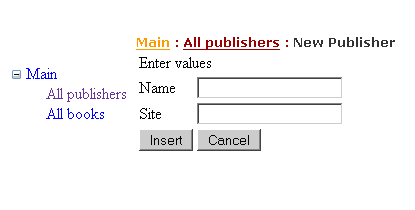
Now, if you run the
project, and press new  button, you will
see the following


Sure that all books it
is not implemented yet – but it is your task to do it.


Now we will proceed to
the localization part. We want to be able that people see the content in
English and French.

We will localize just
one form, and we left the others as an exercise to the reader.

The setting of
language will be set in a cookie on the user’s PC and will be read each time.

Add a drop down list
to the master page, near
Book application with the following code:

<asp:DropDownList runat=”server” id=”ddlLanguage” OnSelectedIndexChanged=”ddlLanguage_SelectedIndexChanged” AutoPostBack=”true”>

                            <asp:ListItem Text=”English”
Value=”en”>

                            </asp:ListItem>

                            <asp:ListItem Text=”French”
Value=”fr”>

                            </asp:ListItem>

                       
</asp:DropDownList>


On the .cs page, let’s
store the actual configuration :

protected void
ddlLanguage_SelectedIndexChanged(object sender,
EventArgs e)

    {

        HttpCookie
cookie = Request.Cookies[“Language”];

        cookie.Value = ddlLanguage.SelectedValue;

        Response.AppendCookie(cookie);

        cookie.Expires = System.DateTime.Now.AddYears(1);

       
Response.Redirect(Request.Url.LocalPath);

    }


So we have saved the
value … now, let’s retrieve it:

protected void
Page_Load(object sender, EventArgs e)

    {

        if
(!IsPostBack)

            ChangeLanguage();


    }

    private void ChangeLanguage()

    {

        HttpCookie
cookie = Request.Cookies[“Language”];

        if
(cookie == null)

        {

            //set
default the cookie in web.config

            string
s = Thread.CurrentThread.CurrentUICulture.Name;

            cookie = new
HttpCookie(“Language”);

            cookie.Value = s;

            cookie.Expires = System.DateTime.Now.AddYears(1);

            Response.AppendCookie(cookie);

        }


        foreach
(ListItem li in
ddlLanguage.Items)

        {

            if
(li.Value == cookie.Value)

            {

li.Selected = true;

                 break;           

}


        }


    }


Now we must change the
language : We can put this on each page, overriding InitializeCulture , or put
in a global.asax file( that retains the application events) on
Application_BeginRequest:
( new item => Global
Application Class)


    protected void Application_BeginRequest(object sender, EventArgs e)

    {

        string
lang = System.Threading.Thread.CurrentThread.CurrentUICulture.Name;

        HttpCookie
cookie = Request.Cookies[“Language”];


        if
(cookie != null && cookie.Value != null)

            lang = cookie.Value;


        System.Threading.Thread.CurrentThread.CurrentUICulture =
System.Globalization.CultureInfo.GetCultureInfo(lang);

        System.Threading.Thread.CurrentThread.CurrentCulture =
System.Globalization.CultureInfo.CreateSpecificCulture(lang);

    }


It is time now to
proceed to the localization

Add an Asp.NET folder,
named “App_LocalResources”


And in this folder,
add three resource files, named :

frmPublisherList.aspx.en.resx

frmPublisherList.aspx.fr.resx

frmPublisherList.aspx.resx

(The file name is
compose by the name of the aspx file + (optional) language + .resx )

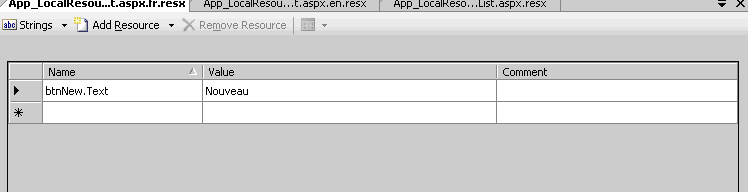
In these files we will
add just one string for the Text property of the button that is new, like in
the figure:


Now, we put meta:resourcekey=”btnNew” on the button:

<asp:Button ID=”btnNew” runat=”server”
Text=”New”
OnClick=”btnNew_Click”
meta:resourcekey=”btnNew”/>   


And we will see in
this mode the translation by changing from English to French in the combo.

Attention: if you do
not have the invariant culture file ( the one without language in the name) it
does not work!

If you have several
items that are invariant ( like the “save” 
button) you can add resources to the special folder App_GlobalResources
and add there resx files ( that now can be named as you want to ) As example
suppose we have now in the App_GlobalResources the files

Buttons.en.resx

Buttons.fr.resx

Buttons.resx

And one resource named

btnSaveText

We can acces as so :


<%$
Resources:Buttons,btnSaveText%>


<asp:Button ID=”btnSave”
Text=”<%$
Resources:Buttons,btnSaveText%>“ runat=”server” OnClick=”btnSave_Click” />

Or , programatically,
by writing :

Resources.Buttons.btnSaveText


Next time we will look
at making a DOS project for the same application

Items to read:

Localization: http://quickstarts.asp.net/QuickStartv20/aspnet/doc/localization/localization.aspx

Master Pages:

http://quickstarts.asp.net/QuickStartv20/aspnet/doc/masterpages/default.aspx

Dilema veche si Cine ne duce la teatru

Pe mine ma duce la teatru fiul meu, de 3 ani
Ultima oara am vazut la Teatrul Tandarica Alba ca zapada,si a fost destul de interesant-si cu citeva poante pentru parinti

Dar sa continuam cu Dilema veche
Mircea Vasilescu vede “Diferente culturale” in discursul lui Basescu despre piratarea produselor MS si in gestul celor 2 romani de a fotografia intr-o incinta militara -tara lui”merge si asa”, “scopul scuza mijloacele”, unui”mod de gindire care mizeaza pe […]descurcat, nesocoting regulile sau macar incercind sa se <<imprieteneasca>> pe din dos cu ele” fata in fata cu tara”contractelor, a pactelor care trebuie respectate, in care nu se pot inventa scuze si acomodari pentru a justifica orice”

Cristian Ghinea , punind punctul pe i ca de obicei:”E timpul ca sa se renunte la iluzia ca Alianta D.A. mai are viitor si sa se accepte ca are doar un prezent. Macar asa politicienii ar avea ce sa discute cind se intilnesc in fiecare luni seara. De pilda, cum sa guverneze.”

Adrian Cioroianu are un articol despre cum lumea se inseala de fiecare data – cu trimitere la incalzirea globala…

Vintila Mihailescu discuta despre “Atlasul Romaniei” in care se arata clar predominenta agrar-rurala a populatiei

Vasile Dem. Zamfirescu despre “Va udrez bine”,”tovarasul Nastase” si alte acte ratate

Cezar Paul Badescu despre diferenta intre securitatea RDG si RO- “Teroare soft“-si da,dupa cum descrie, la ei a fost chiar soft

Ioana Avadani si-a facut blog : http://avadani.hotnews.ro/
Sa vedem cit o tine entuziasmul inceputurilor

Radu Pavel Gheo pare ca si-a intrat in mina cu articolul incorect politic despre Cetateanul European- despre antiamericanismul sau, despre antisemitismul sau soft, despre sentimentul egalitarist cu cei din Vest…

Una peste alta- doua ore de lectura placute

google analytics si trafic.ro

m reusit sa pun Google Analytics pe acest site ,iar trafic.ro aveam deja.
In plus, newtelligence dasBlog are si el trackingul lui(dar reprezinta doar o parte din site…)

Sa vedem rezultatele pe data de 8 februarie:

Trafic.ro:
Data              Vizitatori      Afişări
Joi, 08.02.2007      0      0     

dasBlog:

Summary                 Hits
Internet Searches    70
Referrer Urls             362

Analytics:
Visits: 74
Pageviews: 138

De ce Analytics imi da mai putin decit dasBlog cind ar trebui sa fie invers?

Ma uit mai atent la dasBlog si vad User Agents “ciudati”:
User Agents

Mozilla/5.0 (compatible; Yahoo! Slurp;) 150
Mozilla/5.0 (compatible; Googlebot/2.1; +http://www.google.com/bot.html) 8
msnbot/1.0 (+http://search.msn.com/msnbot.htm)     23
Netvibes (http://www.netvibes.com/; 1 subscriber)     19
Bloglines/3.1 (http://www.bloglines.com; 1 subscriber)     18
Mediapartners-Google/2.1     16
SharpReader/0.9.7.0 (.NET CLR 1.1.4322.2032; WinNT 5.1.2600.0)     5
Feedfetcher-Google; (+http://www.google.com/feedfetcher.html)     2
RssBandit/1.3.0.42 (http://www.rssband…)    1
msnbot-media/1.0 (+http://search.msn.com/msnbot.htm)     1

In totului tot, vreo 243 , deci 362-243 = 119 – si deci se apropie de ceea ce da Google Analytics.

As vrea sa ii spun lui trafic.ro ca este super slab- ca pe 2 februarie am intrat de 2 ori- o data de la servici, o data de acasa- deci ar fi trebuit sa aiba CEL PUTIN 2 utilizatori
Acum, daca e prost sau o face pe prostul- asta e alta problema… Dar pentru mine e un 0 barat.

O sa il mai las citeva luni- si o sa fac diferenta intre el si Google Analytics.
Dar – folositi Google Analytics!

cotidianul – peter ackroyd despre chatterton si imitatia din operele de arta

In principiu sunt de acord cu ideea ca marile lucruri au fost spuse de pe timpul filozofiei grecesti- si nu conteaza ce spui, ci cum o spui
Totusi, de aici pina sa consideri ca cel care imita este mai bun decit cel imitat- chiar daca cel care imita poate imita pe mai multi-  e o distanta lunga.Si sunt pentru ca fiecare artist sa isi gaseasca drumul propriu, chiar daca produce ca opera de arta o pisatoare
Cartea incearca sa fie un fel de Numele Trandafirului(Umberto Eco), incercind sa te familiarizeze cu o multime de scriitori/pictori mai mult sau mai putin cunoscuti de catre romani si un fel de descriere a moravurilor unei societati in stilul Punct Contrapunct(Aldous Huxley) .
Altfel, scrisa bine si cu nerv – desi subiectul nu ma convinge.
In plus, nu reusesc sa inteleg un om care traieste de citiva ani buni pe spinarea nevestei- si aceasta mai crede in el, il sprijina si il incurajeaza. Destul de dificil de crezut, nu?Sau poate am cunoscut eu doar femei mai dure?

catavencu, bill gates si Romania

Este adevarat ca declaratia lui Basescu, referitoare la cistigul romanesc de pe urma pirateriei, a fost prea dura.
E adevarat ca pentru Gates s-a pregatit covorul rosu – dar care tara nu ar fi facut la fel?
Dar vroiam sa vorbesc despre articolul lui Dragos din Catavencu : ca de obicei, plin de adevaruri partiale.
Sa evidentiez doar unul:
“stiind ca am putea adopta sisteme echivalente gratuit”…
Dragos –  sa iti aduca aminte ca acum 10 ani Linux, ca interfata GUI utilizator, era aproape de 0 ?
Ca era dificil sa il instalezi ?

Imi aduc aminte ca luasem RedHat 1.5 – cd de la Teora – si a durat 1 saptamina sa gasesc fisierul in care sa pun linia care sa imi asigure functionarea placii de sunet. Da, e adevarat ca acum Linux a evoluat … dar acum 10 ani ? Care era productivitatea omului obisnuit daca ii puneai un Linux  cu … – sau un Windows cu Excel si Word – si la care mergea rapid si imprimanta, fara configurari prea destepte -doar apasari pe “Next” ?

Si, apropo de vizita lui Gates, multe linkuri aici:
http://www.newsin.ro/Dosare.aspx?dosarId=e5602187-f48a-4e33-af3c-e4ea7f506cdc

tutorial .NET – p8 – edit in ASP.NET


Now we will edit the
Publisher objects .

Add a new WebForm ,
name it frmPublisher_Insert.aspx and make sure the “Place code in separate
file” and “Select master page” are both selected by default.

Change in source view
the title from “
Untitled Page” to “Insert Publisher”

Now we must put
controls in place to insert publishers

There must be the name
and site of the publisher.

I prefer enter a table
for this and the page will look like this:


<%@ Page Language=”C#” MasterPageFile=”~/Book.master” AutoEventWireup=”true” CodeFile=”frmPublisher_Insert.aspx.cs” Inherits=”frmPublisher_Insert”
Title=”Insert
Publisher”
%>

<asp:Content ID=”Content1″ ContentPlaceHolderID=”ContentPlaceHolder1″ Runat=”Server”>

    <table>

        <tr>

            <td colspan=”2″>Enter values

            </td>

        </tr>

        <tr>

            <td>

               Name

            </td>

            <td>

                <asp:TextBox ID=”txtName” runat=”server”>

                </asp:TextBox>

            </td>

        </tr>

        <tr>

            <td>

               Site

            </td>

            <td>

                <asp:TextBox ID=”txtSite” runat=”server”>

                </asp:TextBox>

            </td>

        </tr>

        <tr>

            <td><asp:Button ID=”btnSave” Text=”Insert” runat=”server” />

            </td>

            <td><asp:Button ID=”btnCancel” Text=”Cancel” runat=”server” />

            </td>

        </tr>

    </table>

</asp:Content>


Now switch to design
view and double click on Insert button in order to generate Click event. Double
click in solution explorer the frmPublisher_Insert.aspx and , in Design view,
double click on Cancel button in order to generate Click event.

For cancel it is clear
what we must do – redirect to the
frmPublisherList.aspx

Response.Redirect(“frmPublisherList.aspx”, false);

For save button, we
must create a new publisher and save

  Publisher p
= new Publisher();

        p.Name = txtName.Text;

        p.Site = txtSite.Text;

        p.Insert();

       
Response.Redirect(“frmPublisherList.aspx”,
false);

Please try it by
setting the frmPublisher_Insert.aspx as start page and run the project (F5)

If all works well
(please ensure that Insert has a call to Save()) you will see in the frmPublisherList.aspx
the item you just selected.

It is clear that frmPublisherList.aspx
has a need for a new button . Let’s put it

<asp:Button ID=”btnNew” runat=”server”
Text=”New”
OnClick=”btnNew_Click”
/>

And on code:

protected void
btnNew_Click(object sender, EventArgs e)

    {

        Response.Redirect(“frmPublisher_Insert.aspx”, false);

    }

That will be ok for
adding a new publisher.

Now for editing and
deleting we can make on list… but I prefer having 2 new pages.

So modify a little bit
the code on the grid, in order to have the edit and delete operations : the
edit will be a link , and the delete will be a button to see how different is
the model on the two implementations.

The list page now
looks like this:

<%@ Page Language=”C#” MasterPageFile=”~/Book.master” AutoEventWireup=”true” CodeFile=”frmPublisherList.aspx.cs” Inherits=”frmPublisherList”
Title=”Publisher
Lists”
%>

<asp:Content ID=”Content1″ ContentPlaceHolderID=”ContentPlaceHolder1″ Runat=”Server”>

    <asp:GridView ID=”grdPublisher” runat=”server” AutoGenerateColumns=”false”>

        <Columns>

            <asp:BoundField DataField=”Site” HeaderText=”Site” />

            <asp:BoundField DataField=”Name” HeaderText=”Name” />

            <asp:TemplateField HeaderText=”Operations”>

                <ItemTemplate>

                    <asp:Button runat=”server” ID=”btnDelete” CommandName=”deletepub” CommandArgument=’<%#
Eval(“IDPublisher”) %>‘ Text=”Delete” />

                    <asp:HyperLink runat=”server” ID=”hkEdit” NavigateUrl=’<%#
Eval(“IDPublisher”,”~/frmPublisher_Edit.aspx?ID={0}”) %>‘ Text=”Edit”></asp:HyperLink>

                </ItemTemplate>

            </asp:TemplateField>

        </Columns>


    </asp:GridView>

    <br />

    <asp:Button ID=”btnNew” runat=”server” Text=”New” OnClick=”btnNew_Click” />

</asp:Content>


The link hkEdit is
self explanatory – it goes to the
frmPublisher_Edit.aspx with the ID of publisher in the row.

For the button we must
create the event – and the event is on the grid itself – is the
RowCommand

On the .cs file:

    protected void grdPublisher_RowCommand(object
sender, GridViewCommandEventArgs e)

    {

        switch(e.CommandName)

        {

            case
“deletepub“:

                int
idPublisher;

                if(int.TryParse(e.CommandArgument.ToString(),out idPublisher))

                {

                    Response.Redirect(“frmPublisher_Delete.aspx?ID=”+
idPublisher, false);

                    return;

                }

                Response.Write(“Can not find id:” + idPublisher);

                break;

            default:

                Response.Write(“Do not know command : “ +
e.CommandName);

                break;

        }

    }


Now create the two
pages
frmPublisher_Delete and frmPublisher_Edit 

On both we will copy
the table from the new page and the source – without the class declaration. One
more thing is to retrieve from ID the editing publisher:


  int
idPublisher;

        if(!int.TryParse(Request.QueryString[“ID”],out
idPublisher))

        {

            Response.Redirect(“frmPublisherList.aspx”, false);

            return;

        }

        //we have id of the publisher


How can we retrieve
from the ID of the publisher  the object
? Remember that in Windows forms application we did pass from one form to
another the publisher object. Here we have just the Id. For this, we will open
again the Book.sln solution and add the method to load one single object.

I like to put the
method on ColPublisher and make it static … to not apparently create a new
object.


public static
Publisher sLoadFromID(int
ID)

        {

            DbConnection
db = Settings.TheConnection;

            using
(db)

            {

                db.Open();

                IDataReader
ir = Settings.Load(“select
IDPublisher, NamePublisher, SitePublisher from Publisher where
IDPublisher=”
+ ID, db);

                while
(ir.Read())

                {

                    Publisher
p = new Publisher();

                    p.FillObject(ir);

                    return
p;

                }

            }

            return
null;

        }


Compile and go to Web
project.We can have the publisher:

//we have id of the publisher

        Publisher
p = ColPublisher.sLoadFromID(idPublisher);

        if (p
== null)//maybe
someone deleted

        {

            Response.Redirect(“frmPublisherList.aspx”, false);

            return;

        }

        if
(!IsPostBack)

        {

            //now
fill the text boxes

            txtName.Text = p.Name;

            txtSite.Text = p.Site;

        }


Why we have put  (!IsPostBack )
? Simply because the textboxes must be filled only once – the first time. When
the user enter new name and/or new site and after clicks on save, we must
preserve his data .Other problem is that when we have to save the data, we must
have the same code to load the publisher – so we put this into a function into
the page:

private Publisher
pub

    {

        get

        {

            int
idPublisher;

            if
(!int.TryParse(Request.QueryString[“ID”], out
idPublisher))

            {


                return
null;

            }

            //we have
id of the publisher

            return
ColPublisher.sLoadFromID(idPublisher); ;


        }

    }


The code on PageLoad
will be now shorter :

protected void
Page_Load(object sender, EventArgs e)

    {

        Publisher
p = pub;

        if (p
== null)

        {

            Response.Redirect(“frmPublisherList.aspx”, false);

            return;

        }


        if
(!IsPostBack)

        {

            //now
fill the text boxes

            txtName.Text = p.Name;

            txtSite.Text = p.Site;

        }

    }


And we must modify the
code on saving also :

protected void
btnSave_Click(object sender, EventArgs e)

    {

        Publisher
p = pub;

        if (p
== null)

        {

            //TODO :
throw an exception that someone deleted the publisher

            Response.Redirect(“frmPublisherList.aspx”,
false);

            return;


        }


        p.Name = txtName.Text;

        p.Site = txtSite.Text;

        p.Update();

        Response.Redirect(“frmPublisherList.aspx”, false);

    }


You can modify also
the text of btnsave from “Insert” to “Save”

On the delete page we
will put the same code to retrieve the Publisher .Here is the code:

using System;

using System.Data;

using System.Configuration;

using System.Collections;

using System.Web;

using System.Web.Security;

using System.Web.UI;

using System.Web.UI.WebControls;

using System.Web.UI.WebControls.WebParts;

using System.Web.UI.HtmlControls;

using BookObjects;


public partial
class frmPublisher_Delete
: System.Web.UI.Page

{

    private Publisher pub

    {

        get

        {

            int
idPublisher;

            if
(!int.TryParse(Request.QueryString[“ID”], out
idPublisher))

            {


                return
null;

            }

            //we have
id of the publisher

            return
ColPublisher.sLoadFromID(idPublisher); ;


        }

    }

    protected void Page_Load(object
sender, EventArgs e)

    {

        Publisher
p = pub;

        if (p
== null)

        {

            Response.Redirect(“frmPublisherList.aspx”, false);

            return;

        }


        if
(!IsPostBack)

        {

            //now
fill the text boxes

            txtName.Text = p.Name;

            txtSite.Text = p.Site;

        }

    }

    protected void btnSave_Click(object
sender, EventArgs e)

    {

        Publisher
p = pub;


        if(p !=
null)

            p.Delete();


        Response.Redirect(“frmPublisherList.aspx”, false);

    }

    protected void btnCancel_Click(object
sender, EventArgs e)

    {

        Response.Redirect(“frmPublisherList.aspx”, false);

    }

}


Do not forget to
change the text “Insert” of btnSave to “Delete”. You also can put readonly
property to true on the textboxes

<%@ Page Language=”C#” MasterPageFile=”~/Book.master” AutoEventWireup=”true” CodeFile=”frmPublisher_Delete.aspx.cs” Inherits=”frmPublisher_Delete”
Title=”Untitled
Page”
%>

<asp:Content ID=”Content1″ ContentPlaceHolderID=”ContentPlaceHolder1″ Runat=”Server”>

    <table>

        <tr>

            <td colspan=”2″>Enter values

            </td>

        </tr>

        <tr>

            <td>

               Name

            </td>

            <td>

                <asp:TextBox ID=”txtName” runat=”server” ReadOnly=”true”>

                </asp:TextBox>

            </td>

        </tr>

        <tr>

            <td>

               Site

            </td>

            <td>

                <asp:TextBox ID=”txtSite” runat=”server” ReadOnly=”true”>

                </asp:TextBox>

            </td>

        </tr>

        <tr>

            <td><asp:Button ID=”btnSave” Text=”Delete” runat=”server” OnClick=”btnSave_Click” />

            </td>

            <td><asp:Button ID=”btnCancel” Text=”Cancel” runat=”server” OnClick=”btnCancel_Click” />

            </td>

        </tr>

    </table>

</asp:Content>


Next time we will put
some modifications to the site: a site map(in order to can have indications for
the user where he is)  and code to change
and load resources in English and French languages at run time.

 

5 lucruri despre mine

Dupa ce m-am rugat de Brie sa ma ia in seama, iata-ma ajuns in rindul lumii care scrie despre orice…
1. Mi-am dorit toata viata sa fiu prof de mate- si am si fost, din timpul facultatii…Dar apoi casatoria mi-a pus problema banilor
2.Inca regret anumite fapte din trecutul meu apropiat si indepartat- dar nu am cum sa le rezolv si am invatat sa traiasc cu ele
3.La 10 ami, in 1980, visam ca in anul 2000 sa ajung in spatiu -acum, la 37, visez sa am casuta mea la tara
4.Imi place viata linistita, intruchipata in plimbari in afara tarii, discutii cu prietenii la un restaurant, o carte buna si o inghetat snickers.
5.Stiu care e cea mai mare minune a lumii : Gindesc sa ridic un deget- si el chiar se ridica… Cum?

urmatorii 5, daca vor, sunt
Bogdan Manolea
Dan Bunea
 Mr Smersh
Stalker
Cryogenic

dilema veche si Cum se mai moare

Andrei Plesu este, ca niciodata, concis si la obiect in problema comunismului :”Dar pentru a semnala raul facut de Marx, prin comunism, pot depune marturia experientei mele de viata, ca si pe aceea a milioane de semeni ai mei. As fi satisfacut daca, pentru a semnala “ce e bun” in comunism mi s-ar pune pe masa nu “idei” si “argumente”, ci tot fapte de experienta[…]. In aceasta privinta sunt marxist.Vreau sa verific teoria prin practica[…]Dati-mi citeva  fapte bune”

Mircea Vasilescu, sumar, despre Constitutia Europeeana:”In cuvintele lor se citea mindria fata de proceduri, fata de stilul tratativelor, nu fata de “produsul finit”. “

Cristian Ghinea demonteaza acuzele PSD fata de Basescu … si e clar ca are dreptate.

Vintila Mihailescu:”Daca Franta are cultura, Italia este cultura”

Emil Brumaru:”Si femeile imi zimbesc lenes din solduri”

Catalin Avramescu :”Hume[…] despre Rousseau:”A facut atita pe nebunul incit la urma a innebunit de-adevaratelea””

Si de la ei am aflat ca la ProCinema, simbata , ora 22, se difuzeaza “Piesa neterminata pentru pianina mecanica” Stiu ca l-am vazut in adolescenta… si a fost superb!

Radu Pavel Gheo incearca sa faca “Ghidul incorect politic a Europei Unite”- dar nu are suflul necesar.Poate episodul 2?